
SiteSkite’s Bring Your Own AI (BYO) settings now include first-class providers for OpenRouter and Hermes. Both are OpenAI-compatible gateways: you connect with your API key, pick a model, and use that provider in AI Chat, AI Site Studio, and other assistant workflows.
This complements direct providers such as OpenAI, Anthropic, Gemini, DeepSeek, Kimi, and GLM.
What OpenRouter and Hermes give you
OpenRouter
One API key for many models across providers
Model IDs use a
provider/modelslug (for exampleanthropic/claude-sonnet-4.6)Default API base:
https://openrouter.ai/api/v1
Hermes
OpenAI-compatible multi-model gateway
Use your Hermes API key and preferred model slug
Default API base:
https://api.hermes-ai.net/api/v1
How to add OpenRouter or Hermes
Step 1: Open AI provider settings
Open the SiteSkite Dashboard
Go to Settings → AI Assistant → Provider Settings
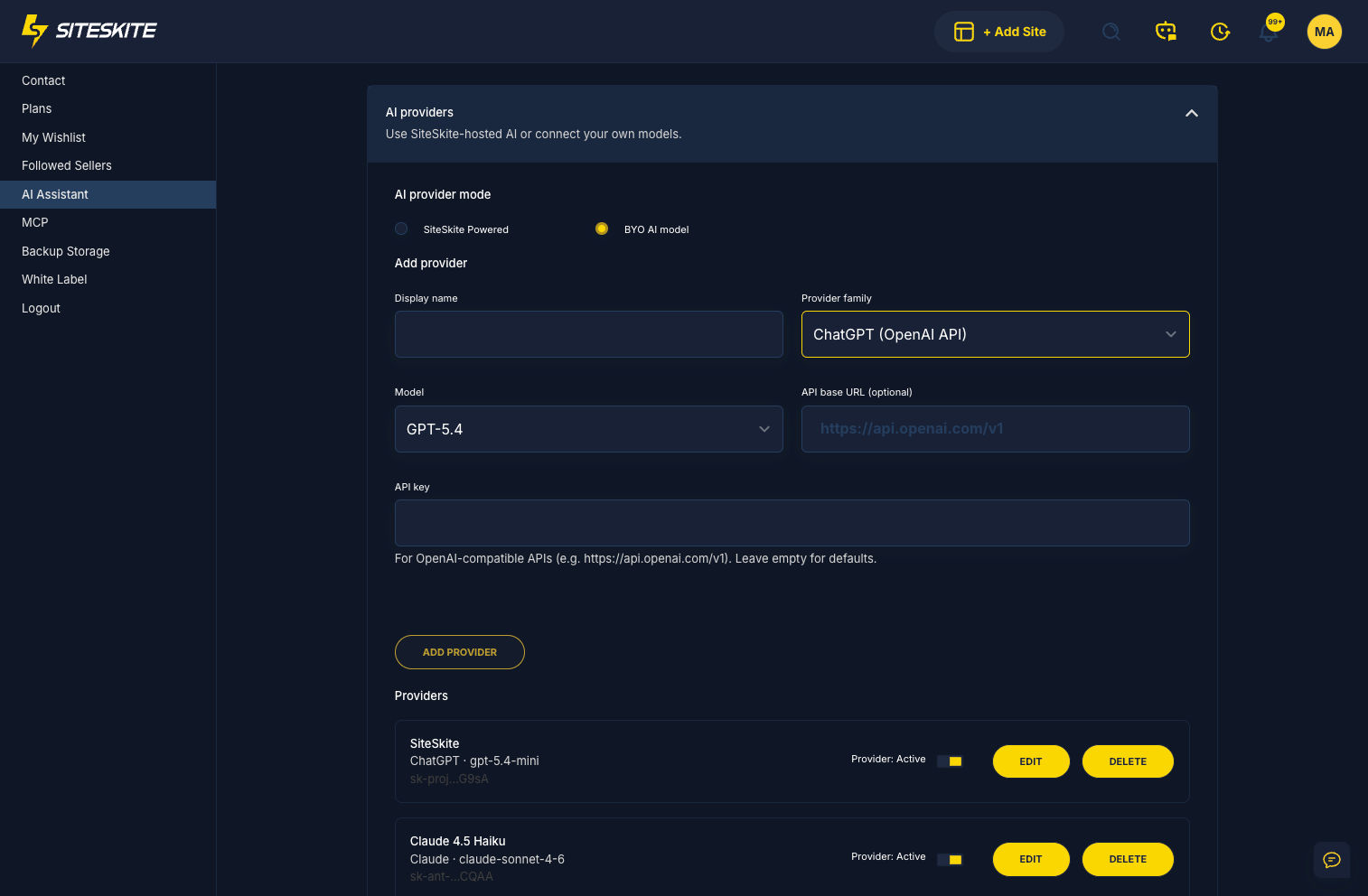
Step 2: Choose BYO AI model
Under AI Provider Mode, select BYO AI model (if you are not already using your own keys)
Step 3: Add a provider
Fill in:
Display name — e.g.
OpenRouter productionorHermes agency keyProvider family — choose OpenRouter or Hermes
Model — pick a preset or enter a custom gateway model slug
API key — paste the key from your OpenRouter or Hermes account
API base URL — leave the default unless your gateway uses a custom endpoint
Step 4: Save and activate
Click Add Provider
Toggle the provider Active
Select it when starting AI Chat or AI Site Studio
Tips for model slugs
OpenRouter and Hermes expect gateway-style IDs (often
vendor/model-name)If a model fails, confirm the slug in your provider’s model list and that your key has access
You are billed by OpenRouter or Hermes directly — SiteSkite does not resell those tokens
Related reading
Bring Your Own AI (BYO LLM) — overview of BYO vs SiteSkite Powered AI
Troubleshooting
Provider rejected / invalid key
Regenerate the API key in OpenRouter or Hermes
Confirm you selected the matching provider family
Model not found
Use a current
provider/modelslug from that gatewayAvoid OpenAI-only short names unless the gateway documents them
Wrong billing
Usage for these providers is charged on your OpenRouter/Hermes account, not SiteSkite AI credits
Summary
Add OpenRouter or Hermes under BYO AI provider settings, activate the integration, and select it in the assistant. You keep one SiteSkite workflow while choosing models through your preferred gateway.