
If your SiteSkite site shows issues such as backups not running, cron jobs failing, 401 Unauthorized errors, or site connection problems, Cloudflare security and caching rules are the most common cause.
SiteSkite is a REST API–based system and relies on uninterrupted machine-to-machine communication. Certain Cloudflare protections can mistakenly block or cache these requests.
This guide explains how to identify, confirm, and fix Cloudflare interference correctly using the new Cloudflare dashboard.
Why Cloudflare Can Break SiteSkite
Cloudflare may interfere due to:
Bot Fight Mode
WAF (Web Application Firewall)
Managed / JS Challenges
Rate Limiting
API response caching
Header stripping (Authorization headers)
These protections are designed for browsers, not authenticated API calls like SiteSkite backups and cron triggers.
Where “Firewall Events” Are Now (Important)
Cloudflare has moved all security logs into a single place.
✅ New Location:
Log Explorer
This replaces:
Firewall Events
Bot Fight logs
WAF decisions
Rate limiting logs
How to Check If Cloudflare Is Blocking SiteSkite
Step 1: Open Log Explorer
Log in to Cloudflare
Select your domain
From the left menu, click Log Explorer
Step 2: Filter SiteSkite API Requests
Paste this into the Log Explorer search bar:
http.request.uri.path contains "/wp-json/siteskite"Press Enter.
Step 3: Show Only Blocked or Challenged Requests
Add this filter:
and (securityAction eq "block" or securityAction eq "managed_challenge" or securityAction eq "js_challenge")✅ Final filter:
http.request.uri.path contains "/wp-json/siteskite"
and (securityAction eq "block" or securityAction eq "managed_challenge" or securityAction eq "js_challenge")
Set the time range to when the backup or cron failed.
What You’ll See If Cloudflare Is the Problem
Typical log entries:
Client IP |
Request Path |
Action |
Trigger |
|---|---|---|---|
193.x.x.x |
/wp-json/siteskite/... |
managed_challenge |
Bot Fight |
162.x.x.x |
/wp-json/siteskite/... |
block |
WAF (OWASP) |
Clicking an entry shows:
Which rule blocked it
Why it was blocked
What behavior triggered Cloudflare
This is your confirmation.
Fix 1: Exclude SiteSkite API from Cloudflare Security
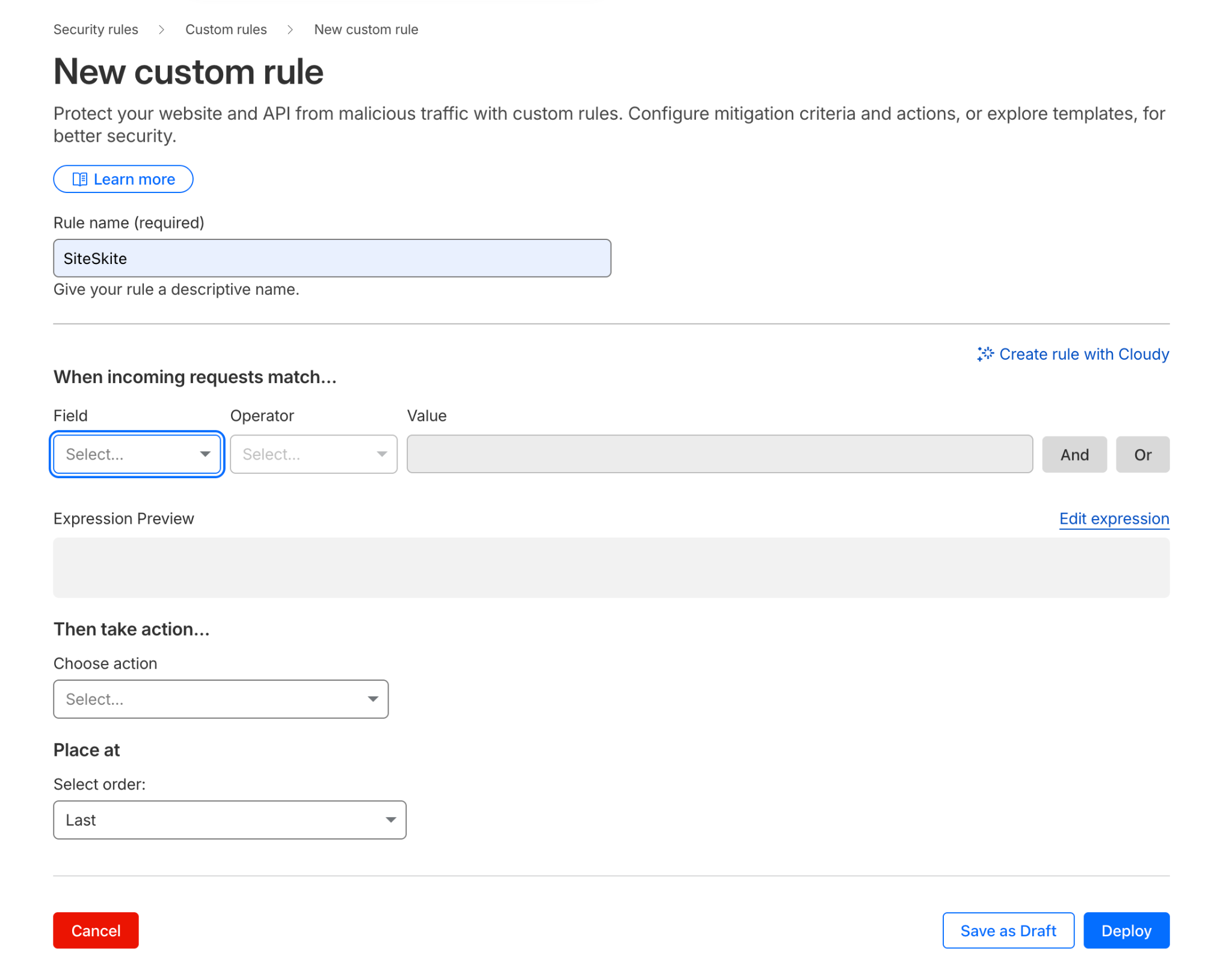
Create a Security Rule
Go to:
Security → Security Rules → Create Rule
IF condition:
http.request.uri.path contains "/wp-json/siteskite/"Action:
Choose Skip and enable skipping:
WAF
Bot Fight Mode
Rate Limiting
💡 This tells Cloudflare:
“This is a trusted API endpoint. Do not interfere.”
Save the rule.
Fix 2: Disable Cloudflare Caching for SiteSkite API
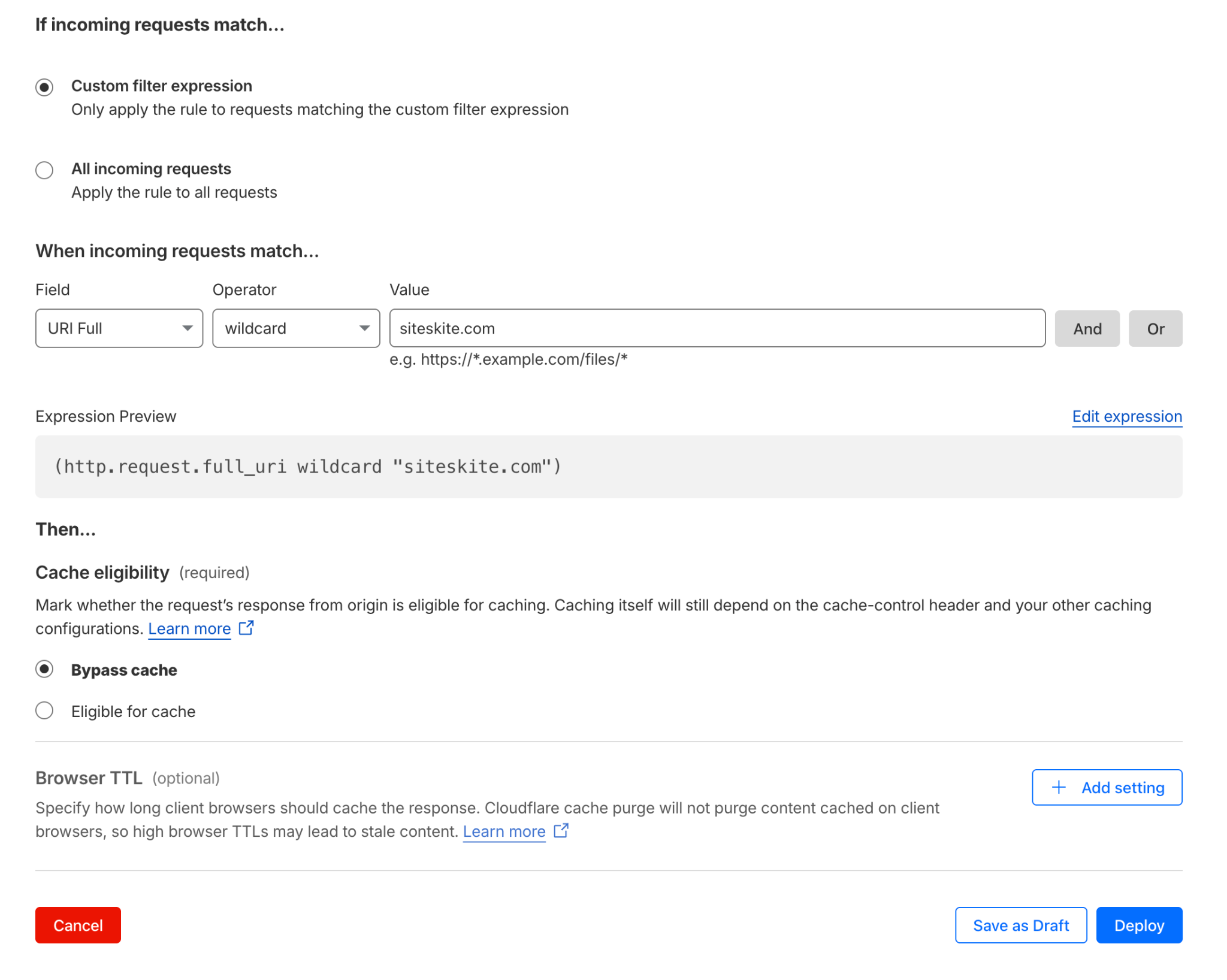
Cloudflare caching API responses can cause:
Frozen backup progress
Cached 401 errors
Stuck status updates
Create a Cache Rule
Go to:
Caching → Cache Rules → Create Rule
IF condition:
uri.path contains "/wp-json/siteskite/"Action:
Cache status → Bypass
Save.
Why Other Sites May Work But SiteSkite Doesn’t
Your other projects may work because they:
Don’t protect
/wp-jsonDon’t require Authorization headers
Don’t use authenticated cron APIs
Don’t have Bot Fight Mode enabled
SiteSkite does all of the above for security, which is why Cloudflare must be explicitly configured.
Symptoms That Indicate Cloudflare Interference
Backups stuck at a fixed percentage
Random 401 Unauthorized errors
Cron jobs failing intermittently
Site shows “Unable to communicate”
API works locally but fails externally
First request works, subsequent ones fail
Best Practice Recommendation
Always whitelist SiteSkite API endpoints in Cloudflare:
/wp-json/siteskite/*This ensures:
Reliable backups
Stable cron execution
Accurate progress reporting
Smooth site connection
No random failures
Need Help?
If you copy one blocked log entry from Log Explorer, SiteSkite support can immediately identify:
The exact Cloudflare rule
The required fix
Whether the issue is WAF, Bot Fight, or caching related
Summary
Cloudflare is powerful—but aggressive by default.
SiteSkite is secure—but requires API-friendly handling.
Once Cloudflare rules are configured correctly, SiteSkite backups and site connections become rock-solid and predictable.