
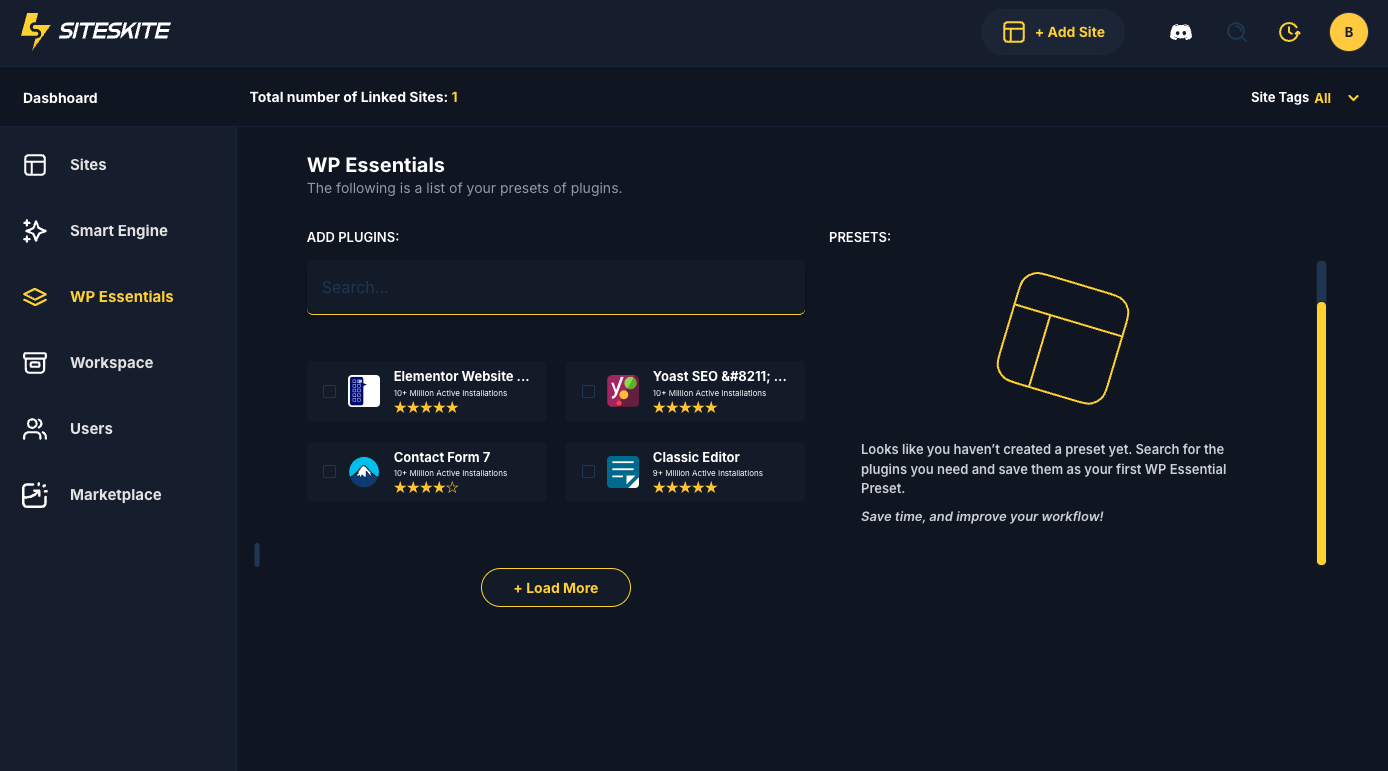
WP Essentials is a powerful WordPress plugin preset management system inside SiteSkite.
It allows you to bulk install, activate, or deactivate a curated list of essential plugins on your connected site — all in one click.
No need to search plugins individually. No manual installation.
Just select a preset → apply → and SiteSkite will instantly set up the recommended tools on your WordPress website.
This feature is perfect for:
Agencies onboarding new client sites
Developers setting up new environments
Users who want ready-to-go plugin stacks
Standardizing workflows across multiple sites
Creating Presets
SiteSkite allows you to build your own preset—ideal for agencies or teams with specific stack requirements.
How to Create Your Own Preset
Open WP Essentials
Click Create New Preset
-
Add plugins to the preset:
By slug
From WordPress repository
Or using already installed plugins
-
Define preset behavior:
Install
Activate
Deactivate conflicting plugins
Save the preset
Your preset appears in your Essentials list immediately.
Why Create Custom Presets?
✔ Use same plugin stack across all new client sites
✔ Reduce setup time from hours to seconds
✔ Maintain your agency’s internal standards
✔ Ensure consistency across staging, dev, test & production
✔ Perfect for onboarding new staff or outsourcing work
Using Presets on Multiple Sites
Once created, your preset becomes reusable for all your linked sites.
Steps:
Open the Site → WP Essentials
Choose your custom preset
Click Apply Preset
This allows you to copy your ideal plugin environment to dozens or hundreds of sites instantly.
Why It Is Powerful
WP Essentials removes the most repetitive part of WordPress setup.
Instead of: Install plugin → activate → configure → repeat
You simply:
Apply Preset → SiteSkite handles the rest.
This can reduce a 30–45 minute setup to a few seconds.
Benefits of WP Essentials
1. Massive Time Saver
Set up a fresh WordPress site with all needed plugins in seconds.
2. Consistency Across Sites
Perfect for agencies who need standardized setups.
3. Reduces Human Errors
No accidental plugin omissions or wrong versions.
4. Client-Friendly Setup
Clients get a fully optimized environment from day one.
5. Works with Bulk Site Operations
Apply presets across multiple sites easily.
Using WP Essentials Presets to Install Plugins on Your Linked Site
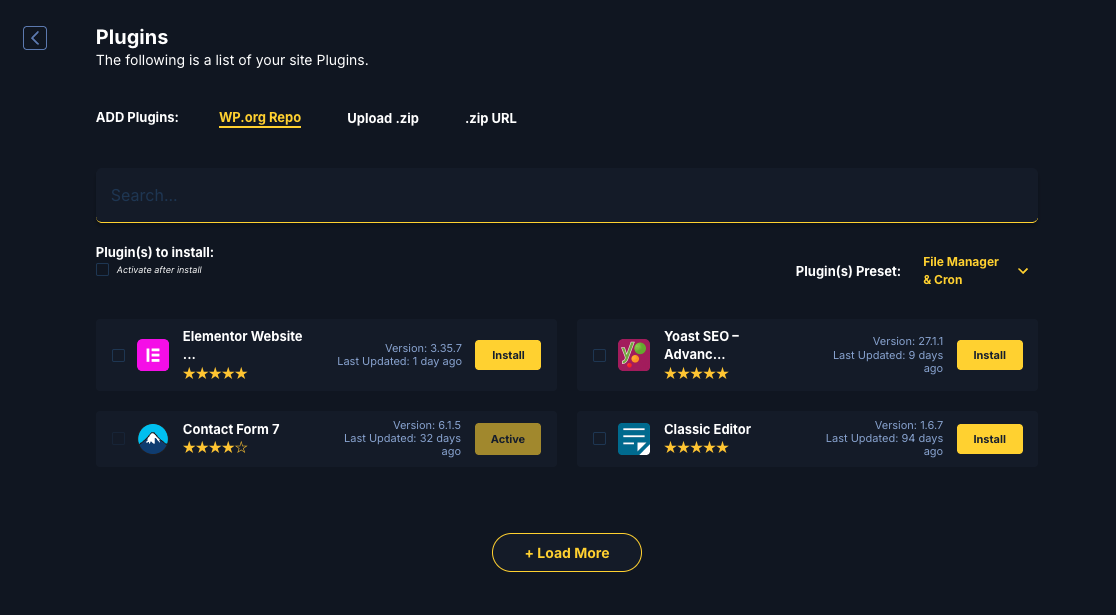
Once you create a WP Essentials preset in SiteSkite, it becomes available directly inside your Linked Site → Plugins installation screen. This allows you to install an entire set of predefined plugins on your WordPress website with a single action.
Instead of searching and installing plugins one by one, you can simply choose your preset and let SiteSkite handle the rest.
Where to Access Your WP Essentials Presets
To use your preset on a linked website:
Open the SiteSkite Portal.
Select your Linked Site.
Navigate to the Plugins tab.
Click Add Plugins.
In the plugin installer screen, locate the Plugin(s) Preset dropdown menu.
Select the preset you created in WP Essentials.
Once selected, the list of plugins included in the preset will appear in the installer.
Installing Plugins from a Preset
After selecting the preset:
Review the plugins included in the preset.
Optionally enable Activate after install if you want plugins activated automatically.
Click Install.
SiteSkite will then:
Install all missing plugins from the preset
Activate them if the option is enabled
Skip plugins already installed on the site
This process allows you to deploy a full plugin stack to your website in seconds.
Benefits of Using WP Essentials Presets
Using presets through the plugin installer provides several advantages:
Faster setup – Install multiple plugins in one click.
Consistent configurations – Use the same plugin stack across multiple sites.
Reduced manual work – No need to search or install plugins individually.
Perfect for agencies – Quickly onboard new client websites with your standard toolkit.
Better workflow efficiency – Deploy development or security stacks instantly.
Example Use Cases
Common presets agencies create include:
SEO Setup
Yoast SEO
Redirection
XML Sitemap tools
Security Stack
Login protection
Security firewall
Activity monitoring
Developer Toolkit
Advanced Custom Fields
Debugging tools
Migration plugins
Client Essentials
Contact form
SMTP mail plugin
Page builder
With WP Essentials, these stacks can be deployed instantly to any linked site.
Important Notes
Presets must first be created inside WP Essentials before they appear in the plugin installer.
Presets only install plugins; they do not overwrite existing site configurations.
Plugins already installed on the site will not be duplicated.
Summary
WP Essentials is your shortcut to rapid, automated, and standardized WordPress plugin setup.
With ready-made presets and the ability to create custom ones, SiteSkite makes plugin management painless and incredibly efficient—especially for agencies managing large portfolios.