
SiteSkite allows you to power its AI assistant using your own AI models (BYO LLM) or use SiteSkite Powered AI out of the box.
This flexibility gives you full control over how AI is used inside your WebOps workflow—whether you want simplicity or complete customization.
What is BYO LLM?
BYO LLM (Bring Your Own Large Language Model) lets you connect your own AI provider (like OpenAI or Anthropic) to SiteSkite.
Instead of relying on default AI, you can:
Use your own API keys
Choose your preferred model
Control usage and billing
Customize AI behavior for your workflow
This is ideal for agencies, developers, and teams who want full control over AI usage and costs.
AI Provider Modes in SiteSkite
SiteSkite offers two modes:
1. SiteSkite Powered AI (Default)
No setup required
Uses SiteSkite-managed AI models
Ready to use instantly
Billing handled by SiteSkite
Perfect if you want a plug-and-play AI experience.
2. BYO AI Model
Connect your own AI provider
Use your own API key
Full control over model and usage
Direct billing from your provider
Perfect if you want flexibility and control.
Supported AI Providers
Currently, SiteSkite supports:
ChatGPT (OpenAI API)
Models like GPT-4o
Requires OpenAI API key
Claude (Anthropic API)
Models like Claude 4.5 Haiku / Sonnet
Requires Anthropic API key
More providers may be added in the future.
How to Enable BYO LLM
Follow these steps to connect your own AI model:
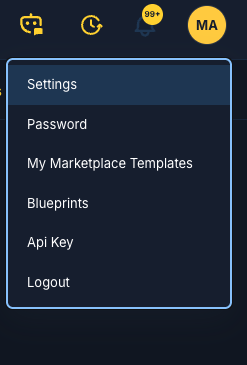
Step 1: Go to AI Settings
Open SiteSkite Dashboard
-
Navigate to Settings → AI Assistant → Provider Settings
Step 2: Select “BYO AI Model”
-
Under AI Provider Mode, select:
BYO AI model
Step 3: Add a Provider
Fill in the required details:
Display Name
A custom name for your provider
Example:My OpenAI Account
Provider Family
Choose:
ChatGPT (OpenAI API)
Claude (Anthropic API)
Model
Select the model you want to use:
GPT-4o (OpenAI)
Claude Sonnet / Haiku
API Base URL (Optional)
Leave empty for default
Use custom endpoint if needed
Example:
https://api.openai.com/v1API Key
Paste your provider API key:
OpenAI → from OpenAI dashboard
Anthropic → from Anthropic console
Step 4: Save Provider
Click Add Provider
Your provider will appear in the list
Toggle it Active
Dashboard AI Actions
You can control whether SiteSkite uses AI inside the dashboard.
Toggle: Provider Dashboard AI Actions
Enabled → AI features active (automation, insights, actions)
Disabled → AI usage blocked in dashboard
Note:
Site health scores remain visible regardless
Disabling reduces AI usage and cost
How BYO AI Works in SiteSkite
Once enabled:
SiteSkite sends requests using your API key
AI responses are generated using your selected model
You maintain control over usage and limits
All actions still use SiteSkite tools and permissions
Benefits of BYO LLM
Full Cost Control
You are billed directly by your AI provider.
Model Flexibility
Choose the best model for your needs.
Custom Workflows
Use AI tailored to your agency or development workflow.
Privacy & Control
Your API keys remain private and encrypted.
Security & Data Handling
API keys are securely stored and encrypted
Keys are never returned in full
SiteSkite uses your session for tool execution
You can remove or rotate keys anytime
When Should You Use BYO LLM?
Use BYO AI if:
You already use OpenAI or Anthropic
You want control over AI billing
You need specific models or configurations
You run AI-heavy workflows
Use SiteSkite AI if:
You want zero setup
You prefer simplicity
You don’t want to manage API keys
Best Practices
Monitor usage from your provider dashboard
Choose lighter models (e.g., 4.0 mini) for cost efficiency
Keep API keys secure and never expose publicly
Troubleshooting
AI Not Responding
Check API key validity
Ensure provider is active
Invalid API Error
Verify correct provider (OpenAI vs Anthropic)
Check API base URL
No AI Actions in Dashboard
Enable Dashboard AI Actions toggle
Summary
The BYO LLM feature in SiteSkite gives you the freedom to use your own AI models while leveraging SiteSkite’s powerful WebOps tools.
Whether you choose SiteSkite Powered AI for simplicity or BYO AI for control, you get a flexible system that adapts to your workflow.
This brings you one step closer to fully customizable AI-driven WordPress operations 🚀